ChatsRat

    Fake AIM chat generator, late-90s instant messages

    The AIM look draws a late-nineties instant message window: a blue title bar, a menu row, a white box where every line starts with a screen name, the time with seconds and a colon, and a bevelled Send button underneath. Nostalgia videos, retro stories and throwback posts about dial-up days use it.

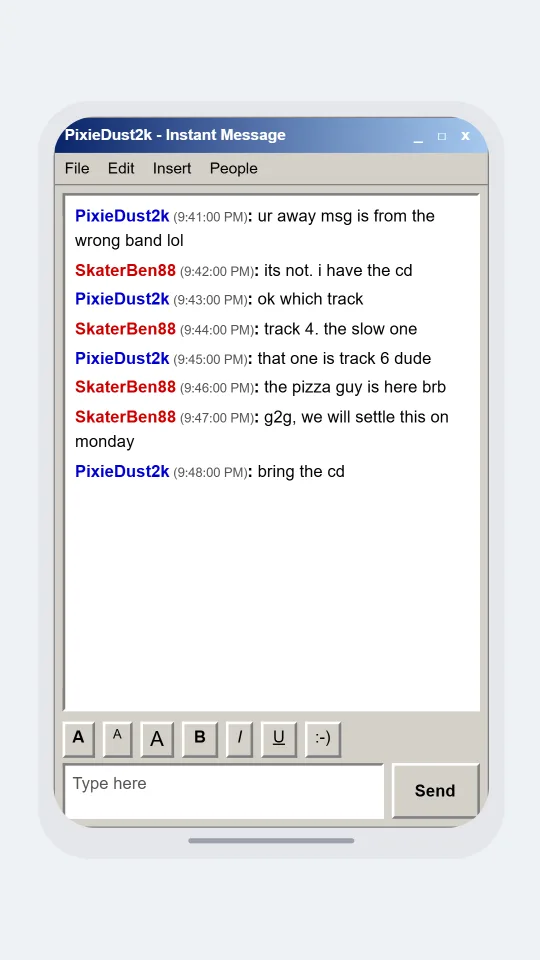
    AIM-style window where two friends argue over which band wrote a song quoted in an away message
    Away message and a song argument
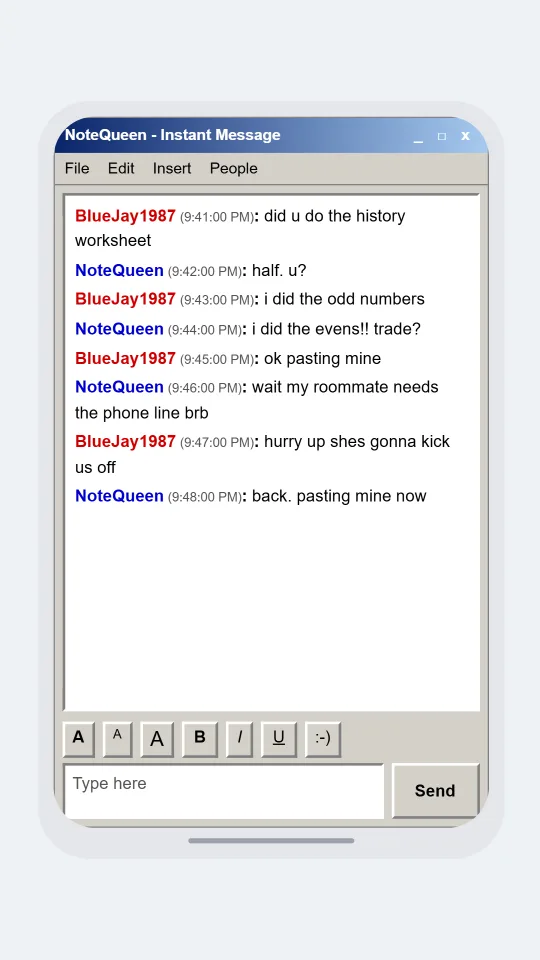
    AIM-style conversation about swapping notes for a history quiz while a parent needs the phone line
    Who has the history answers
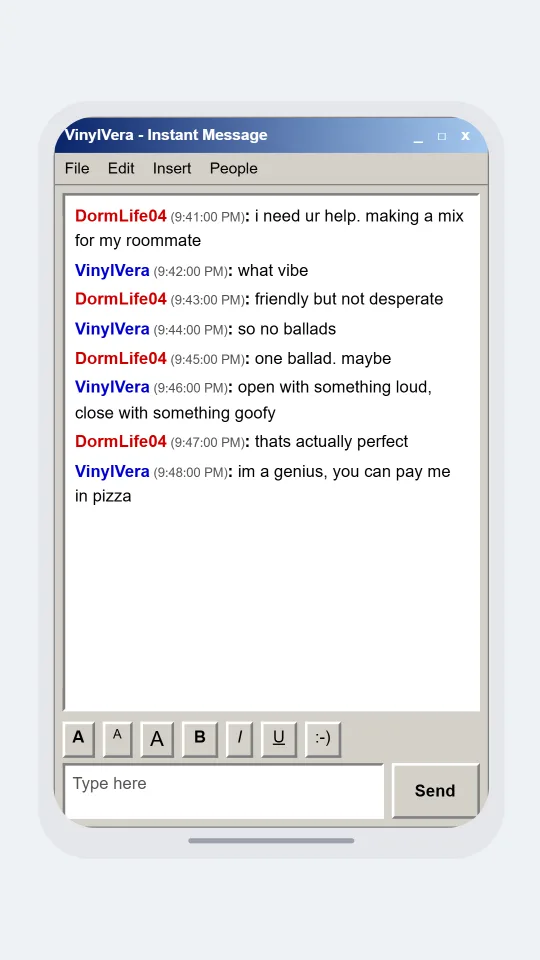
    AIM-style window where a college freshman asks a friend what songs belong on a mix cd for a roommate
    The mix cd confession
    Make one now

    Writing a AIM-style chat that feels right

    Everything about this era sounds like typing with one hand on the phone cord. Screen names carry numbers and weird capitalisation, lines are lower case with trailing dots, and nobody says goodbye so much as g2g. People ask a/s/l, argue about song lyrics set as away messages, and leave the window open while a roommate waits for the phone line. Write that way and the mock-up lands for anyone who lived it.

    The picture is a window, not a phone. Messages are not bubbles: each line begins with the sender's screen name in bold, red for you and blue for them, then a small time with seconds, then a colon and the text. Under the box sits a row of font buttons, a smiley button and a Send button with a raised edge, which are all part of what the look draws.

    Pick period details that are harmless: homework, a campus party, burning a mix, who is allowed on the computer. Keep every character an adult and invent screen names. ChatsRat draws its own original window with no running-figure logo or buddy icons and is not affiliated with or endorsed by AIM or its former owners.

    Three examples to start from

    Away message and a song argument

    Two friends disagree over a lyric quoted in an away message before going offline for dinner.

    PixieDust2k: ur away msg is from the wrong band lol
    SkaterBen88: its not. i have the cd
    PixieDust2k: ok which track
    SkaterBen88: track 4. the slow one
    PixieDust2k: that one is track 6 dude
    SkaterBen88: the pizza guy is here brb
    SkaterBen88: g2g, we will settle this on monday
    PixieDust2k: bring the cd
    Open this example in the editor

    Who has the history answers

    Two college classmates trade notes for a quiz while a roommate waits to use the phone line.

    BlueJay1987: did u do the history worksheet
    NoteQueen: half. u?
    BlueJay1987: i did the odd numbers
    NoteQueen: i did the evens!! trade?
    BlueJay1987: ok pasting mine
    NoteQueen: wait my roommate needs the phone line brb
    BlueJay1987: hurry up shes gonna kick us off
    NoteQueen: back. pasting mine now
    Open this example in the editor

    The mix cd confession

    A freshman builds a mix for a new roommate and asks for rescue on the track order.

    DormLife04: i need ur help. making a mix for my roommate
    VinylVera: what vibe
    DormLife04: friendly but not desperate
    VinylVera: so no ballads
    DormLife04: one ballad. maybe
    VinylVera: open with something loud, close with something goofy
    DormLife04: thats actually perfect
    VinylVera: im a genius, you can pay me in pizza
    Open this example in the editor

    See the first example play as a video

    What is included in this look

    • Screen name lines instead of bubbles. Each message starts with the sender's name in bold, red for the first person and blue for the second, followed by a colon, exactly the plain-text feel of that era.
    • Timestamps with seconds. A small grey time with hours, minutes and seconds follows each name, a detail that makes a transcript look like a saved log rather than a modern chat.
    • Title bar and menu row. The window opens with a blue gradient bar reading the buddy's name and Instant Message, minimise-style marks at the right, and a menu row with File, Edit, Insert and People.
    • Formatting row and Send button. Beneath the text area sit raised buttons for font size, bold, italic, underline and a smiley, plus a Type here box and a bevelled Send button.
    • Typing line. An optional italic line under the conversation says the other person is typing, which is perfect for the pause before a reply that changes everything.
    • Light and dark window. The window is grey and white by default and switches to a dark slate version when you pick the dark scheme, with softer red and blue names.

    Questions

    Why are there no chat bubbles?

    Early instant messenger windows printed a name and a colon before each line, so this look does the same. It also means long messages read like a log. If you want bubbles, pick a modern look such as WhatsApp instead.

    Does it include the old logo or sounds?

    No. The window is original artwork with no running figure and no buddy icons, and it makes no sounds of its own. It is not affiliated with or endorsed by AIM, so call the result an AIM-style mock-up.

    Can I show who is online?

    This look supports an online status in the settings, but the window itself does not draw a buddy list. Use the typing line and your script to show presence, such as an away message line from the other person.

    Which plan includes the AIM look?

    The AIM look is a legacy look on the paid plans. The Free plan includes the free looks such as Discord. The plans page spells out each tier, including video export for nostalgia clips.

    What should I avoid writing?

    Avoid fake transcripts of real people, anything involving minors in romance or conflict, and any chat log presented as genuine evidence. Make clearly labelled retro fiction or humour with invented adult characters.

    Simulated screens only. Not affiliated with AIM. ChatsRat draws its own original screens and uses no logos.