ChatsRat

    Fake MSN Messenger chat generator

    The MSN look draws a mid-2000s conversation window: a bright blue title bar, a banner with two square display pictures and the contact's status, then a transcript that says who spoke in grey with the message indented below. Nostalgia videos, coming-of-age scenes and then-and-now comparisons use it.

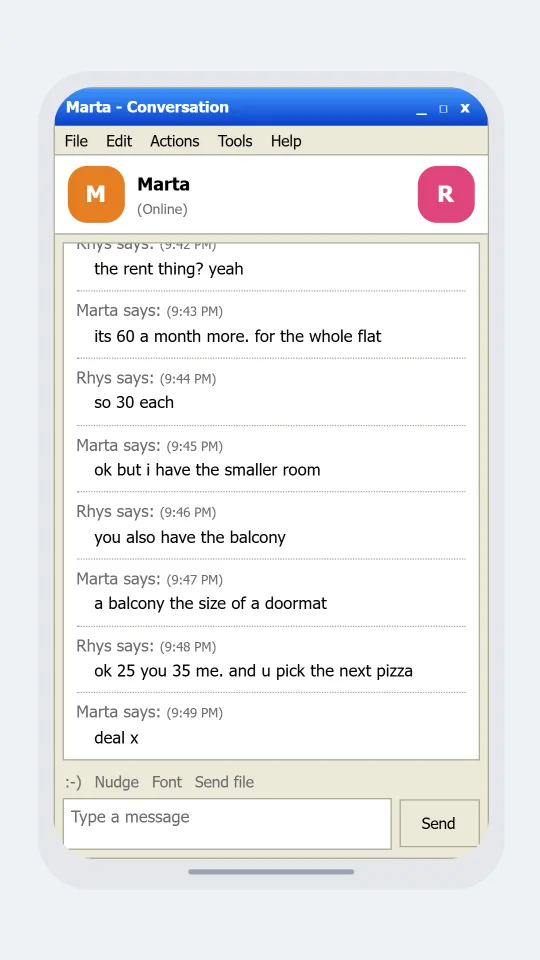
    MSN-style conversation window where two flatmates work out how to split a rent increase fairly
    Flatmates sort out the rent
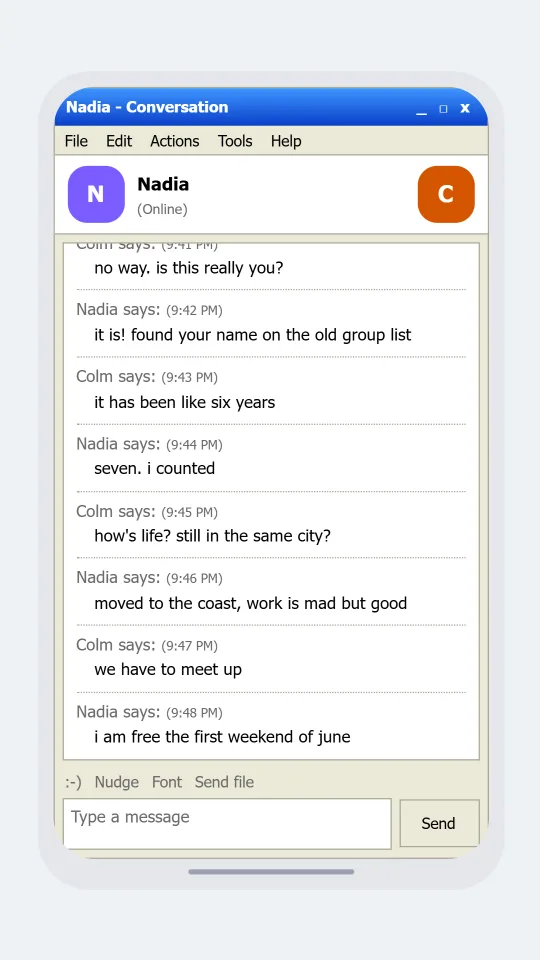
    MSN-style window where two old friends reconnect after years apart and promise to meet up
    An old friend appears online
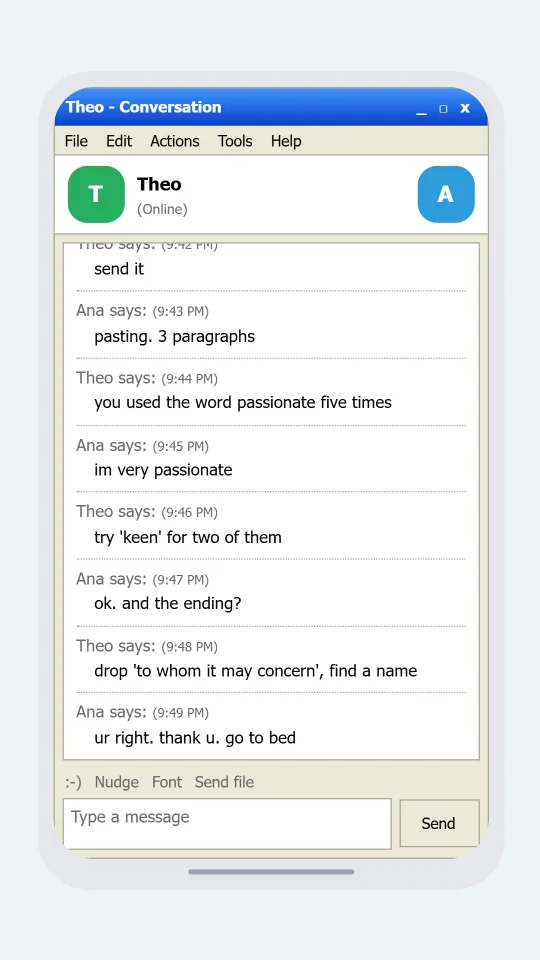
    MSN-style window where a friend helps another proofread a job application cover letter late at night
    Proofreading a job application at midnight
    Make one now

    Writing a MSN Messenger-style chat that feels right

    This was the chat of the school computer room and the family desktop. People changed their display name to a song lyric and a row of symbols, set a status that told everyone they were busy, and sent a nudge to get attention. Conversations were short, full of abbreviations and emoticons made from punctuation, and the pause while someone typed felt long enough to change your mind about what you were going to say.

    The window is organised around the banner. Two square pictures sit at either side with the contact's name and a status in brackets, and below them the transcript prints a grey line saying the name followed by says and a small time, with each message set in below it. A new grey header appears only when the speaker changes, and a dotted rule separates the turns.

    Choose themes that are gentle and plainly adult: flatmates sorting the rent, an old friend finding you again, a late night about a job application. Use invented names. ChatsRat draws its own original window with no butterfly, no mascot and no brand marks, and is not affiliated with or endorsed by MSN or Microsoft. Say it is an MSN-style mock-up wherever you share it.

    Three examples to start from

    Flatmates sort out the rent

    Two flatmates negotiate a rent rise and agree to split it without letting the landlord win.

    Marta: did u see the landlord's email
    Rhys: the rent thing? yeah
    Marta: its 60 a month more. for the whole flat
    Rhys: so 30 each
    Marta: ok but i have the smaller room
    Rhys: you also have the balcony
    Marta: a balcony the size of a doormat
    Rhys: ok 25 you 35 me. and u pick the next pizza
    Marta: deal x
    Open this example in the editor

    An old friend appears online

    Two friends who lost touch find each other online and promise to meet this time.

    Colm: no way. is this really you?
    Nadia: it is! found your name on the old group list
    Colm: it has been like six years
    Nadia: seven. i counted
    Colm: how's life? still in the same city?
    Nadia: moved to the coast, work is mad but good
    Colm: we have to meet up
    Nadia: i am free the first weekend of june
    Open this example in the editor

    Proofreading a job application at midnight

    A friend reads a cover letter at midnight and talks the writer out of the word passionate.

    Ana: ok can u read my cover letter
    Theo: send it
    Ana: pasting. 3 paragraphs
    Theo: you used the word passionate five times
    Ana: im very passionate
    Theo: try 'keen' for two of them
    Ana: ok. and the ending?
    Theo: drop 'to whom it may concern', find a name
    Ana: ur right. thank u. go to bed
    Open this example in the editor

    See the first example play as a video

    What is included in this look

    • The says transcript. A grey line with the speaker's name, the word says and a small time starts each turn, and the message is indented underneath instead of sitting in a bubble.
    • Banner with two display pictures. Two square pictures frame the top of the window, one for each person, with the contact's name in bold and their status in brackets beside it.
    • Status wording. The contact's status reads Online, Away or Appear Offline according to the presence you set, which suits scenes where someone vanishes mid-conversation.
    • Writing a message notice. An optional grey line says the other person is writing a message, which is the exact little wait that every user of the old window remembers.
    • Title bar, menus and toolbar row. A blue title bar says the contact's name and Conversation, a menu row offers File, Edit, Actions, Tools and Help, and a small toolbar lists Nudge, Font and Send file labels.
    • Text box and Send button. A bordered text box with a Type a message placeholder and a plain Send button close the window, finished in a warm grey frame, or a deep navy one in dark mode.

    Questions

    Does it draw the butterfly logo or sounds?

    No. There is no butterfly, mascot or sound effect, only original artwork in the style of a 2000s window. It is not affiliated with or endorsed by MSN or Microsoft, and the name only describes the style.

    Can I have both display pictures show faces?

    The banner uses each person's avatar, which can be an initial with a colour or a picture you upload for that person. Use illustrations or pictures you own, not photos of real people you do not have permission to show.

    Is a nudge animation available?

    The toolbar shows a Nudge label as part of the window, but the look does not shake the screen. You can write a line such as a nudge notice in the script if the scene needs one.

    What plan do I need?

    MSN is a legacy look on the paid plans. The Free plan includes the free looks such as Discord. See the plans page for the tier that covers video export, which suits a nostalgia reel.

    What shouldn't this be used for?

    Do not use it to fake an old chat log between real people, pose as evidence in a dispute or involve minors in romance or conflict. Use it for invented adult characters, humour and clearly labelled retro stories.

    Simulated screens only. Not affiliated with MSN Messenger. ChatsRat draws its own original screens and uses no logos.