ChatsRat

    Fake Slack chat generator for team threads

    The Slack look is not a bubble chat. It draws workspace rows: a square avatar, a bold name with a grey time, follow-up lines that collapse underneath, blue reaction pills with counts, quoted replies and a bordered composer with a formatting row. Product teams, trainers, comedians and workplace storytellers use it for office scenes.

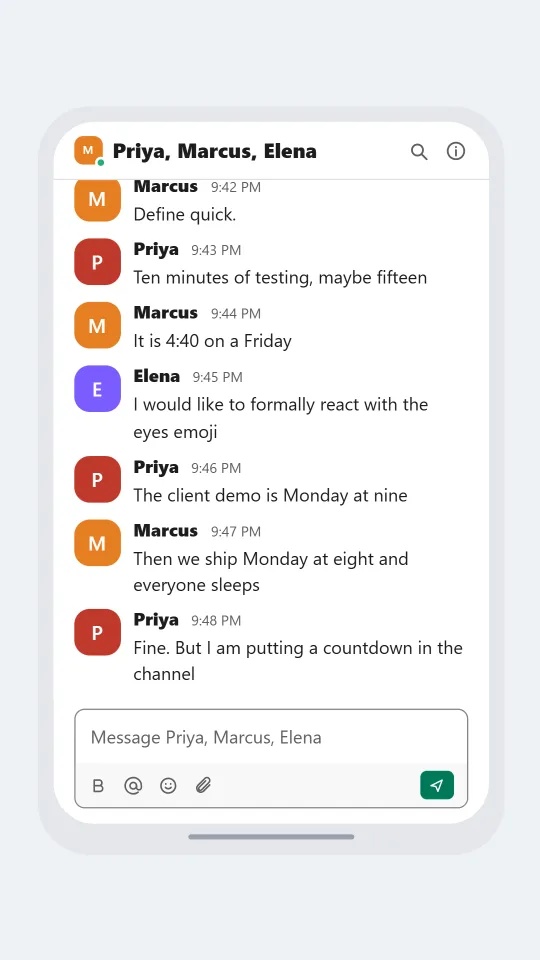
    Slack-style workspace thread where an engineer and a product manager argue about releasing on a Friday afternoon
    The Friday deploy question
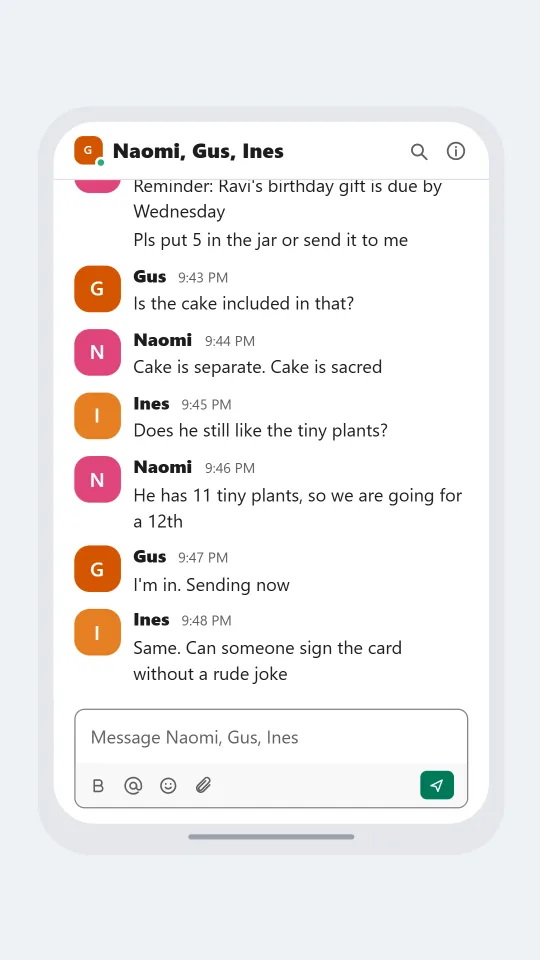
    Slack-style office thread collecting money for a colleague's birthday gift with several teammates replying
    Birthday collection thread
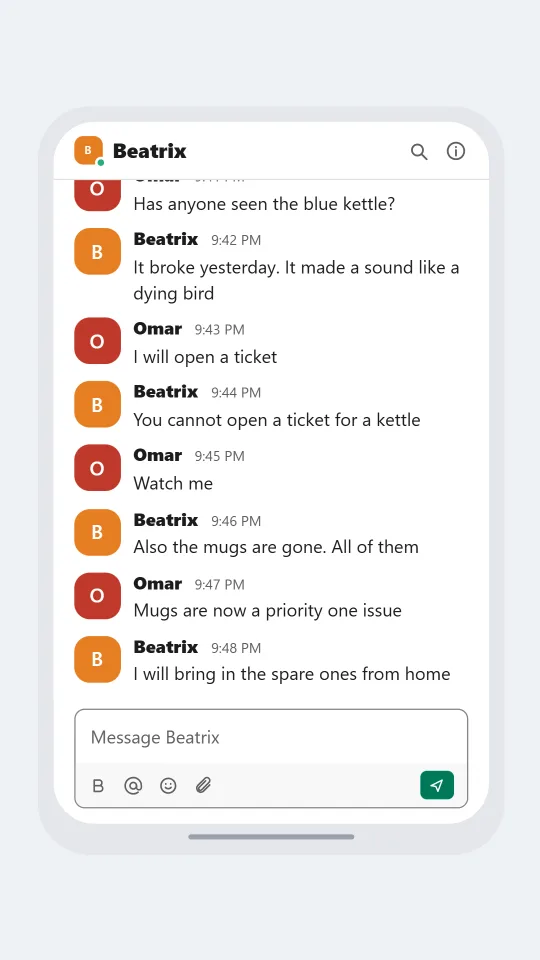
    Slack-style office channel conversation about a mysteriously broken kettle and the missing mugs
    Who left the kitchen like this
    Make one now

    Writing a Slack-style chat that feels right

    Work chat has its own comedy. Someone writes a question and three colleagues reply with an eyes emoji instead of an answer. A decision gets made by a thumbs-up count. Messages open with a greeting and a name, run on for a short paragraph, and end with a deadline that nobody believes. A mock-up feels right when the manager writes in tidy sentences and the engineer replies in fragments.

    The rows are the giveaway. Each person has a square picture, their name in heavy type, a quiet time, and the text sitting straight under it with no bubble around it. If the same person posts again within five minutes the name is dropped and the lines stack. Reactions collect under a message as small outlined pills with a number, which is how a launch announcement shows sixteen party emoji.

    Write about standups, incident threads, birthday collections, who left the kettle on and the channel that should have been an email. Use invented people and companies. ChatsRat draws its own original screen with no logo and is not affiliated with or endorsed by Slack, so label anything you publish as a Slack-style mock-up and never present it as a real company thread.

    Three examples to start from

    The Friday deploy question

    A product manager asks for a Friday release, and an engineer answers with polite alarm.

    Priya: Quick one: can we ship the new onboarding before the weekend?
    Marcus: Define quick.
    Priya: Ten minutes of testing, maybe fifteen
    Marcus: It is 4:40 on a Friday
    Elena: I would like to formally react with the eyes emoji
    Priya: The client demo is Monday at nine
    Marcus: Then we ship Monday at eight and everyone sleeps
    Priya: Fine. But I am putting a countdown in the channel
    Open this example in the editor

    Birthday collection thread

    An office thread organises a gift for a colleague without the colleague seeing it.

    Naomi: Reminder: Ravi's birthday gift is due by Wednesday
    Naomi: Pls put 5 in the jar or send it to me
    Gus: Is the cake included in that?
    Naomi: Cake is separate. Cake is sacred
    Ines: Does he still like the tiny plants?
    Naomi: He has 11 tiny plants, so we are going for a 12th
    Gus: I'm in. Sending now
    Ines: Same. Can someone sign the card without a rude joke
    Open this example in the editor

    Who left the kitchen like this

    The kitchen kettle fails, and a calm investigation turns into a team-wide mug audit.

    Omar: Has anyone seen the blue kettle?
    Beatrix: It broke yesterday. It made a sound like a dying bird
    Omar: I will open a ticket
    Beatrix: You cannot open a ticket for a kettle
    Omar: Watch me
    Beatrix: Also the mugs are gone. All of them
    Omar: Mugs are now a priority one issue
    Beatrix: I will bring in the spare ones from home
    Open this example in the editor

    See the first example play as a video

    What is included in this look

    • Collapsed follow-up lines. When one person posts several messages within five minutes, the avatar and name show once and the later lines stack beneath without a header, as in a real busy channel.
    • Reaction pills with counts. Each reaction is drawn as an outlined blue pill holding the emoji and a number, which lets a mock-up show how many colleagues agreed with a post.
    • Quoted reply line. A reply draws a thin vertical rule with the original sender's name and the first words of their message above the answer.
    • Header with presence dot. The top bar shows the contact's small square avatar with a green presence dot when they are online, then the name or the list of names, with search and info icons.
    • Composer with a formatting row. The bottom box reads Message and the name, with a strip holding bold, at-mention, smile and attach icons and a small green send button.
    • Day divider and typing line. A rounded day label sits between two rules at the top, and an optional line at the bottom says the other person is typing.

    Questions

    Is this a channel or a direct message?

    The header shows the other person's name, or a list of names when you add several people to the cast. It reads as a direct or small group conversation. For a full channel scene with a topic bar, the separate Slack channel look is the better fit.

    Can I use reactions in my script?

    Yes. Slack is one of the looks that supports reactions, and each one shows as a pill with the emoji and a count. Add them to a message in the editor.

    Which plan is required?

    The Slack look is on the paid plans. The Free plan covers the free looks such as Discord. Check the plans page for the tier that includes video export if you want an animated version.

    Does the picture look like the real product?

    It is an original drawing in the same style, with plain shapes and no hash-mark logo, and it is not affiliated with or endorsed by Slack. Say it is a mock-up whenever you post it, especially for a work audience.

    What shouldn't I use it for?

    Do not use it to fake a message from a real boss, client or coworker, to forge a company record, or to deceive a customer or an employer. Keep companies and people invented and the purpose clear.

    Simulated screens only. Not affiliated with Slack. ChatsRat draws its own original screens and uses no logos.