ChatsRat

    Fake Steam chat generator for gamer conversations

    Pick the Steam look for a simple bubble conversation built for gamer talk: your lines on the right in a colour you pick, a friend's in grey on the left, a centred time after pauses, emoji reactions, quoted replies, an online label and typing dots. Streamers, indie developers and meme makers use it for lobby-style scenes.

    Steam-style gamer chat where two friends keep pushing back their weekly co-op night
    Game night keeps slipping
    Steam-style chat where an experienced player calmly guides a new partner through a first co-op match
    A nervous first co-op partner
    Steam-style chat where two friends tempt each other into buying games during a big seasonal sale
    The sale that tests friendships
    Make one now

    Writing a Steam Chat-style chat that feels right

    Conversations between players are full of logistics and loyalty. Who is online, who is inviting whom to a match, who owns the expansion, who still owes someone a favour from the last sale. Messages are short and blunt, nicknames replace real names, and a long silence usually means somebody went to find a charger. A believable mock-up opens in the middle of a plan and closes with a time to meet.

    This page draws the chat as a plain bubble thread rather than a copy of the full client with its friends list and overlay. That is a deliberate trade: the words carry the scene, and the reaction chips, the typing dots and the green online label supply the gamer feel. Write with the usual rhythm of play, such as ready, give me two minutes, who has the headset, and one player lagging behind.

    Stories that work well include a game night that gets rescheduled, a rival who is secretly friendly, a first-time co-op partner and a very long argument about a build. Use invented nicknames and no real brands as characters. ChatsRat draws its own original screen with no logo and is not affiliated with or endorsed by Steam or its owners, so label your picture as a Steam-style mock-up.

    Three examples to start from

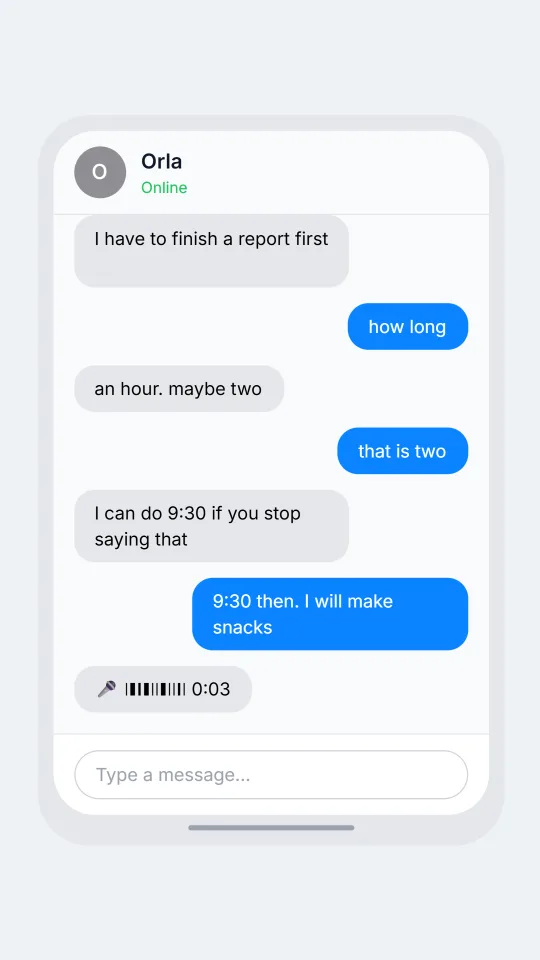
    Game night keeps slipping

    Two friends try three different times for co-op night before someone remembers a laundry basket.

    Vex: co-op tonight? the new patch dropped
    Orla: I have to finish a report first
    Vex: how long
    Orla: an hour. maybe two
    Vex: that is two
    Orla: I can do 9:30 if you stop saying that
    Vex: 9:30 then. I will make snacks
    Orla: [voice: bring the good headset, mine keeps crackling]
    Open this example in the editor

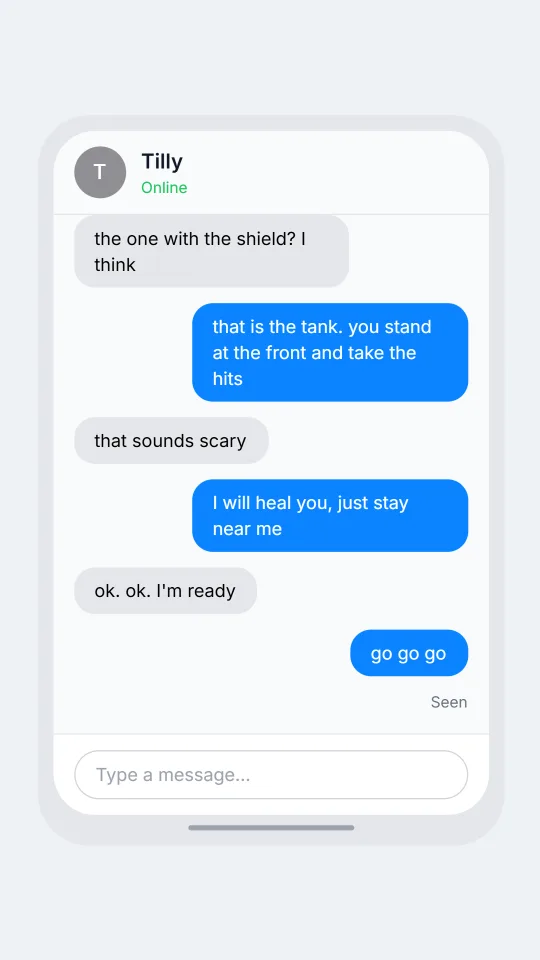
    A nervous first co-op partner

    An experienced player patiently guides a nervous newcomer through a first cooperative match.

    Tilly: hi! sorry, I'm really new at this
    Dax: no worries. what class are you?
    Tilly: the one with the shield? I think
    Dax: that is the tank. you stand at the front and take the hits
    Tilly: that sounds scary
    Dax: I will heal you, just stay near me
    Tilly: ok. ok. I'm ready
    Dax: go go go
    Open this example in the editor

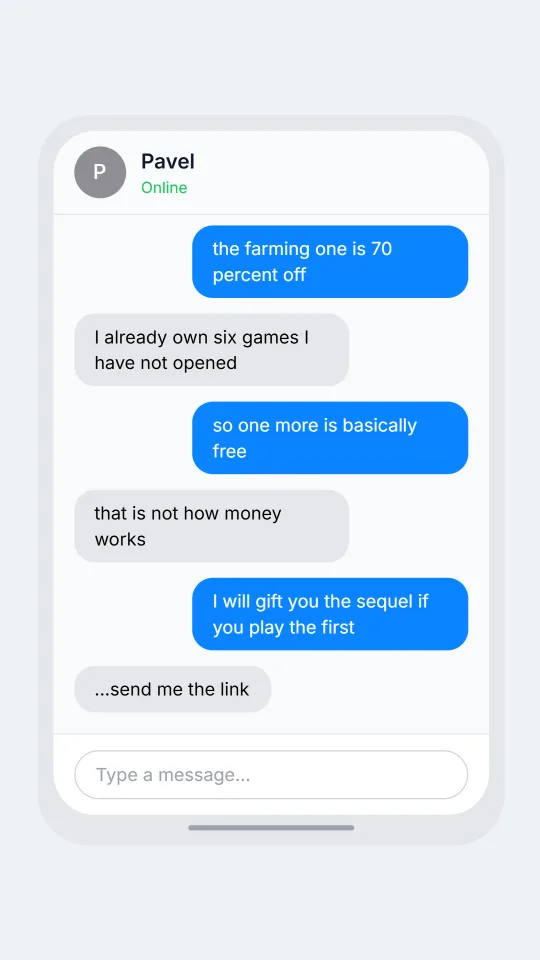
    The sale that tests friendships

    Two friends encourage each other to buy games they will not have time to play.

    Juno: did you see the sale
    Pavel: please do not tell me
    Juno: the farming one is 70 percent off
    Pavel: I already own six games I have not opened
    Juno: so one more is basically free
    Pavel: that is not how money works
    Juno: I will gift you the sequel if you play the first
    Pavel: ...send me the link
    Open this example in the editor

    See the first example play as a video

    What is included in this look

    • Right and left bubbles. Your side takes a bubble colour you choose for each person, while the friend's side is neutral grey, so a two-player chat stays readable on a phone screen.
    • Emoji reactions. Reactions appear as small rounded chips with the emoji under a message, handy for the skull or the fire that answers a bad play without a single word of text.
    • Online label and initial avatar. The header carries a round avatar with the first letter of the friend's name and a green Online label when that person's status is set to online.
    • Typing dots. An optional grey bubble with three bouncing dots shows the friend typing, which lets a video build suspense before an answer about who dropped the match.
    • Quoted replies and pictures. A reply shows the quoted name and text in a small box above the answer, and any picture you add, such as a screenshot of a score, sits inside the bubble.
    • Voice notes and photo lines. Beat lines for a voice note, a captioned photo or a deleted message become normal bubbles here, so a script can include a clip from a headset or a screenshot.

    Questions

    Does it show the Steam friends list or overlay?

    No. It draws one conversation as a simple bubble chat with a header and input bar, without the friends list, game status or overlay. It is not affiliated with or endorsed by Steam, and uses no logos.

    Can I put reactions on messages?

    Yes. Steam Chat is one of the looks with reactions, and each one appears as a small chip with the emoji. Unlike Discord or Slack, this look shows the emoji without a count next to it.

    Do I need a paid plan?

    This look is on the paid plans. The Free plan covers the free looks such as Discord, which is the closer match if you want a free gamer-style chat. The plans page explains the tiers and export options.

    Is there a seen marker?

    No. Read receipts are not part of this look, so a delayed answer has to be shown with a long pause in the script, a typing moment or a line saying the friend went to get a charger.

    What is it not for?

    Do not fake a trade, a ban notice or a message from a real streamer or a real developer, and do not use it to mislead anyone about a purchase or a person. Keep it to fiction, memes and labelled demos.

    Simulated screens only. Not affiliated with Steam Chat. ChatsRat draws its own original screens and uses no logos.