ChatsRat

    Fake TikTok comments generator

    Short videos live and die in their comment sheet, and this look draws one. A tinted video panel sits on top, a centred comment count sits under it, and below come round avatars, names, a Reply link and a heart with a number on the right. Skit makers, social managers writing training material and storytellers use it for fast, punchy exchanges.

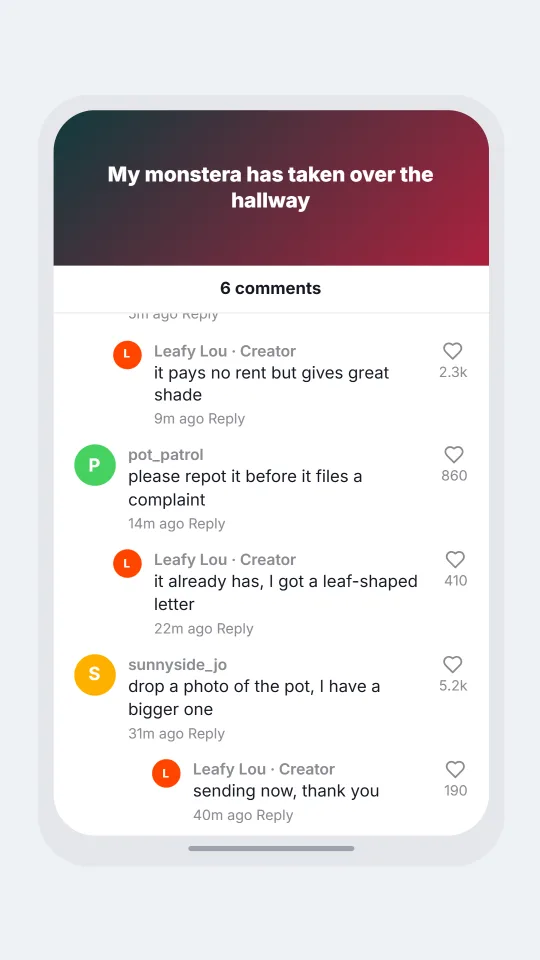
    Comments on a short video about an enormous houseplant with jokes and a creator reply
    The plant that outgrew its pot
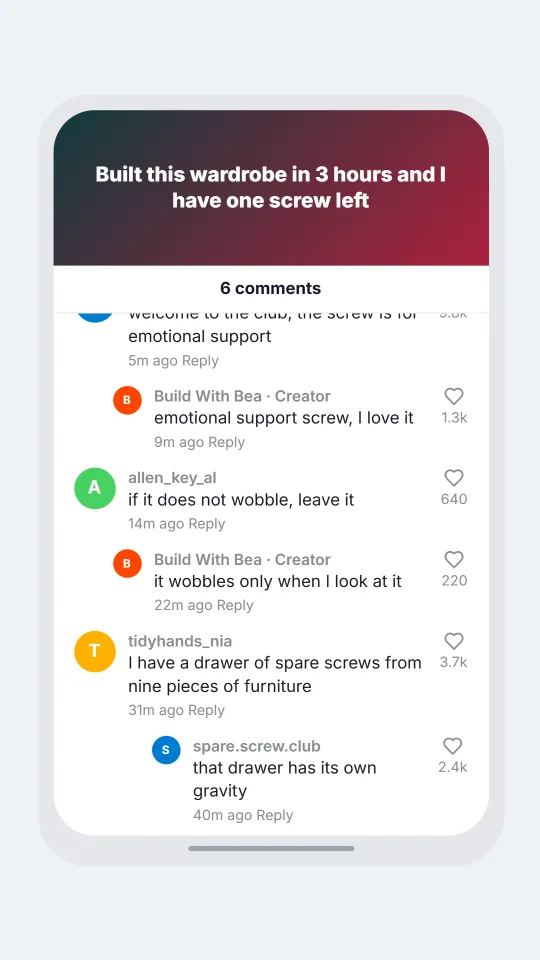
    Comment sheet under a flatpack furniture timelapse with jokes about a leftover screw and a helpful reply
    A wardrobe with one spare screw
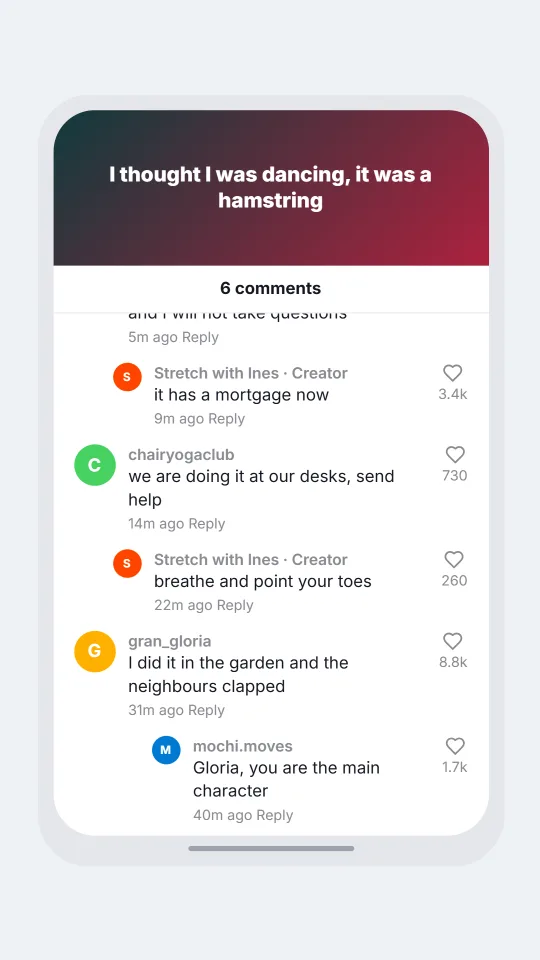
    Comments under a short video where a viral dance turns out to be a morning stretch with playful replies
    A dance that was only a stretch
    Make one now

    Writing a TikTok comments-style chat that feels right

    TikTok comments move at the speed of the clip. A good one is eight words long, quotes a line from the video, and arrives before the creator has finished posting. People tag friends, repeat the catchphrase back to the creator, and answer each other with a single emoji. A mock-up that rambles will break the spell immediately.

    The creator is part of the thread. When they reply, it carries a small Creator tag, and their answers are usually brief, cheerful and a little teasing, like a person replying from a bus stop. Viewers answer back in clusters, and the heart count on a modest joke can outrun the serious comment sitting above it.

    Aim for warmth and absurdity: a plant that outgrew its pot, a flatpack wardrobe, a dance that turns out to be a stretch. ChatsRat draws this sheet by itself with no logos or sound artwork, and it is not affiliated with or endorsed by TikTok. All handles and like counts are invented by you, and the ages are filler.

    Three examples to start from

    The plant that outgrew its pot

    A plant video where the creator replies in four words and a stranger offers the world's gentlest advice.

    POST Leafy Lou: My monstera has taken over the hallway | Day 62 of pretending this is a feature.
    > fernando.w (14200): it is not a plant anymore, it is a tenant
    >> Leafy Lou (2300): it pays no rent but gives great shade
    > pot_patrol (860): please repot it before it files a complaint
    >> Leafy Lou (410): it already has, I got a leaf-shaped letter
    > sunnyside_jo (5200): drop a photo of the pot, I have a bigger one
    >>> Leafy Lou (190): sending now, thank you
    Open this example in the editor

    A wardrobe with one spare screw

    A timelapse build with a leftover screw as the villain, and a reply thread of people confessing their own spares.

    POST Build With Bea: Built this wardrobe in 3 hours and I have one screw left | It stands up straight. I am not touching it.
    > spare.screw.club (9800): welcome to the club, the screw is for emotional support
    >> Build With Bea (1300): emotional support screw, I love it
    > allen_key_al (640): if it does not wobble, leave it
    >> Build With Bea (220): it wobbles only when I look at it
    > tidyhands_nia (3700): I have a drawer of spare screws from nine pieces of furniture
    >>> spare.screw.club (2400): that drawer has its own gravity
    Open this example in the editor

    A dance that was only a stretch

    A creator admits the viral move was a morning stretch, and the comments make it a movement with a name.

    POST Stretch with Ines: I thought I was dancing, it was a hamstring | Nobody told me for a whole week.
    > mochi.moves (21500): you invented the hamstring shuffle and I will not take questions
    >> Stretch with Ines (3400): it has a mortgage now
    > chairyogaclub (730): we are doing it at our desks, send help
    >> Stretch with Ines (260): breathe and point your toes
    > gran_gloria (8800): I did it in the garden and the neighbours clapped
    >>> mochi.moves (1700): Gloria, you are the main character
    Open this example in the editor

    See the first example play as a video

    What is included in this look

    • Video panel on top. A dark panel tinted with teal and pink carries the title from your first script line, so the sheet reads as comments sliding up over a clip.
    • Comment count header. A centred line announces how many comments are in the sheet, a number that counts the comments you have written, followed by a thin divider before the first avatar.
    • Hearts on the right. Each comment has a heart icon at its right edge with the number from your brackets underneath, and short counts such as 12k are displayed in that compact form.
    • Creator tag. When the person who wrote the first line answers in the comments, their name carries a Creator label, which is how viewers spot the creator talking back.
    • Indented replies. A reply moves right under the comment it answers and gets a smaller avatar, with up to four levels available using extra arrow signs at the start of the line.
    • Light and dark sheets. Pick a bright white sheet or a deep navy one, and in a video export the comments arrive one at a time with the newest kept in view at the bottom.

    Questions

    Is the TikTok comments look available on the free plan?

    No, it needs the Standard plan or above. The free plan has chat-style looks, which are a good way to learn the editor before you switch to comment sheets.

    Can I show a video thumbnail or my own footage?

    Not in this look. The top panel is a tinted block showing your title text, with no uploaded footage or music artwork. That keeps the picture original and also makes it clear it is a drawn example.

    How long can a comment be?

    Each line can run to about six hundred characters, but short is better. Real comments here are a handful of words, and a long line will wrap across several rows of the narrow sheet.

    What are the limits on what I make?

    Keep to invented adults and harmless topics. Do not use it for fake proof that a real creator said something, for staged harassment, or to promote a scheme. No children in romantic or hostile scenes.

    Can I tag someone with an at sign?

    Yes, you can type an at sign and a made-up handle inside a comment as ordinary text. It will not become a link or a coloured mention, but it reads naturally in the line.

    Simulated screens only. Not affiliated with TikTok comments. ChatsRat draws its own original screens and uses no logos.