ChatsRat

    Fake AI assistant chat generator

    This look draws a conversation between a person and an AI assistant, in a calm style of our own: a warm page, a small spark icon, your questions in tinted bubbles on the right, and the assistant's longer answers flowing on the left. A small Simulated, fiction label sits in the header. Teachers, comedians and explainer makers use it to show prompts and replies.

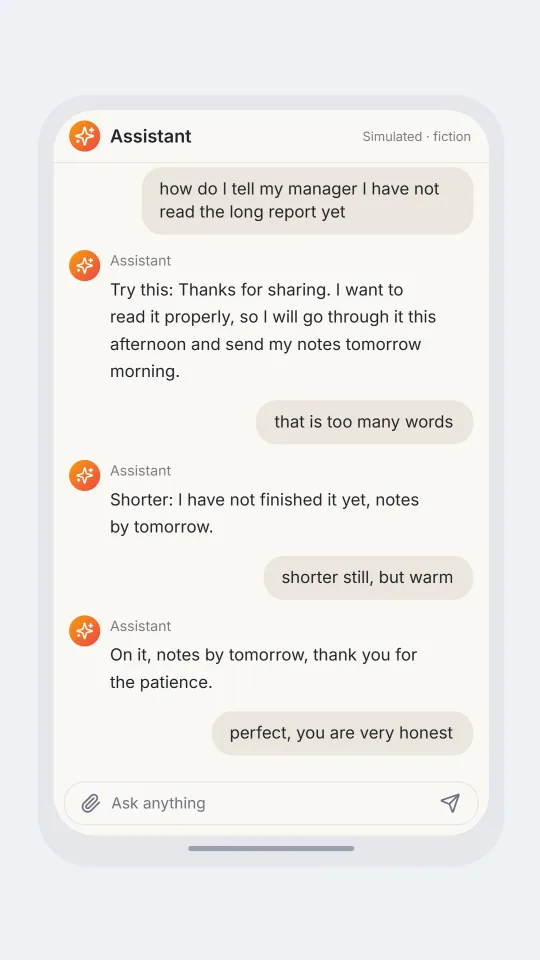
    A warm assistant window where a person asks for a polite excuse and keeps making it shorter
    A polite way to say you did not read it
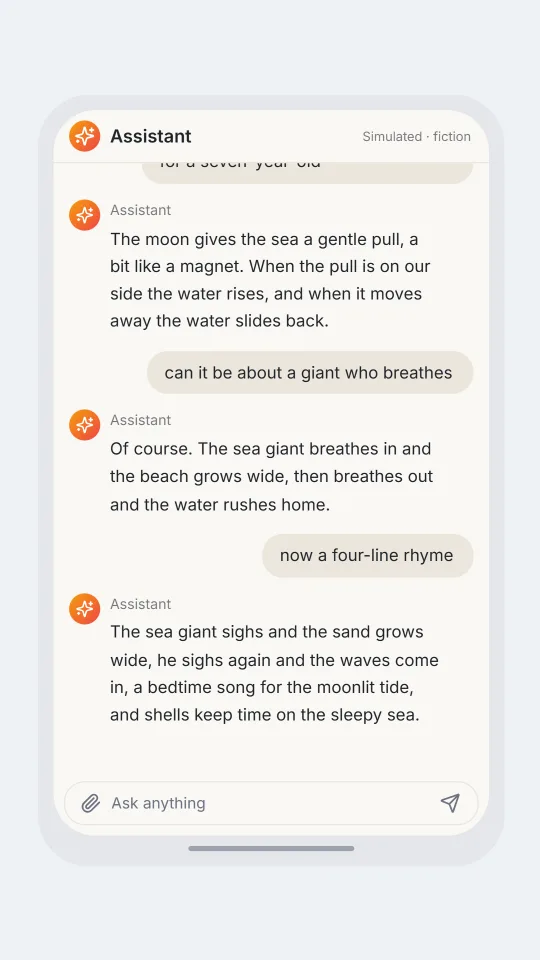
    An assistant window where a parent asks for a simple explanation of tides and then asks for a rhyme
    Explaining tides to a seven-year-old
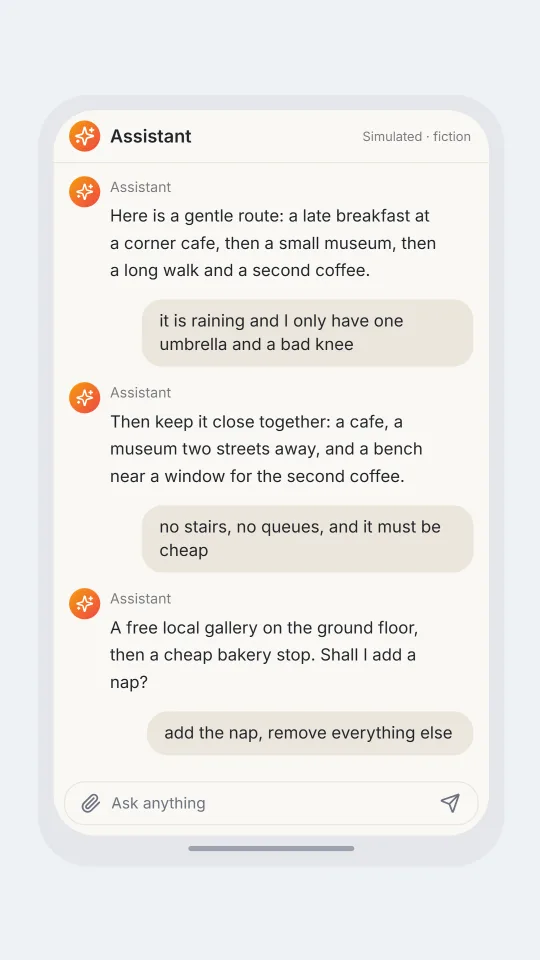
    A user adds more and more constraints to a weekend plan while an assistant adapts patiently
    A weekend plan with too many constraints
    Make one now

    Writing a AI assistant chat-style chat that feels right

    Chats with an AI assistant sound different from chats between friends. People write in half-formed requests, correct themselves, and add constraints one at a time: shorter, friendlier, with a joke, for a seven-year-old. The replies are patient and structured, offer a draft and then a revised draft, and often end with a small question asking which direction to take next.

    That rhythm is the comedy and the lesson. A user asks for something modest and receives something elaborate, or a user is oddly formal and the assistant mirrors them. Good scenes show the person steering, not just receiving: asking for a shorter version, rejecting an adjective, and finally thanking the assistant as if it were a colleague.

    Use this look to demonstrate good prompting, to stage a sketch, or to explain an idea in a video. ChatsRat draws the screen in its own original style, uses no logos, and is not affiliated with or endorsed by any assistant product or company. Every reply is something you write yourself, so nothing on the screen is generated by a real assistant.

    Three examples to start from

    A polite way to say you did not read it

    A modest request is shortened twice until the answer is one honest sentence.

    You: how do I tell my manager I have not read the long report yet
    Assistant: Try this: Thanks for sharing. I want to read it properly, so I will go through it this afternoon and send my notes tomorrow morning.
    You: that is too many words
    Assistant: Shorter: I have not finished it yet, notes by tomorrow.
    You: shorter still, but warm
    Assistant: On it, notes by tomorrow, thank you for the patience.
    You: perfect, you are very honest
    Open this example in the editor

    Explaining tides to a seven-year-old

    A parent steers an explanation from clear to charming, then asks for a rhyme to carry to bedtime.

    Me: explain why the sea goes in and out, for a seven-year-old
    Assistant: The moon gives the sea a gentle pull, a bit like a magnet. When the pull is on our side the water rises, and when it moves away the water slides back.
    Me: can it be about a giant who breathes
    Assistant: Of course. The sea giant breathes in and the beach grows wide, then breathes out and the water rushes home.
    Me: now a four-line rhyme
    Assistant: The sea giant sighs and the sand grows wide, he sighs again and the waves come in, a bedtime song for the moonlit tide, and shells keep time on the sleepy sea.
    Open this example in the editor

    A weekend plan with too many constraints

    A plan grows fussier with every message, and the assistant keeps up, until the user quietly picks the nap.

    User: plan my Saturday, I like cafes and small museums
    Assistant: Here is a gentle route: a late breakfast at a corner cafe, then a small museum, then a long walk and a second coffee.
    User: it is raining and I only have one umbrella and a bad knee
    Assistant: Then keep it close together: a cafe, a museum two streets away, and a bench near a window for the second coffee.
    User: no stairs, no queues, and it must be cheap
    Assistant: A free local gallery on the ground floor, then a cheap bakery stop. Shall I add a nap?
    User: add the nap, remove everything else
    Open this example in the editor

    See the first example play as a video

    What is included in this look

    • Spark avatar and header. A rounded warm-coloured badge with a spark icon sits beside the word Assistant at the top, with a small Simulated label so viewers know the scene is made up.
    • Your side, tinted bubbles. Messages from a person called You, Me or User are drawn on the right in soft tinted bubbles, matching the way a person's questions sit in an assistant window.
    • Open answers on the left. Assistant replies sit on the left without a bubble, next to a small spark badge and a name label, with relaxed line spacing that suits longer answers.
    • Ask anything bar. A rounded input along the bottom shows a paperclip, the words Ask anything and a send arrow, completing the picture of a real prompt box without any working features.
    • Warm light and dark pages. The light page is a soft cream and the dark page a deep slate, so the same script can suit a bright explainer video or a late-night coding scene.
    • Latest turn stays in view. The conversation is anchored to the bottom of the screen, so in a video export each new message appears below the last and earlier ones scroll up.

    Questions

    Is this a real AI assistant?

    No. It is a picture editor. You write both sides of the conversation, and nothing is generated for you inside this look. The header says Simulated so a viewer can tell the scene is staged, which is a good habit to keep in any video.

    Which plan do I need for it?

    The assistant look needs the Standard plan or above. The free plan has chat-style looks, so you can learn how scripts and exports work before moving to this one.

    How do I name the two sides?

    Write lines that start with You, then a colon, for the person, and Assistant, then a colon, for the replies. Names such as Me or User also count as the person's side and appear on the right.

    Can I use it to show an answer from a real product?

    No. Do not present a made-up reply as something a named assistant actually said, and do not use it as proof of what any system produced. Treat it as a sketch, a lesson or a joke, and keep the Simulated label.

    Does it show code blocks, lists or images?

    No. Replies are plain text in one paragraph per line. You can write short lists as sentences, but the look does not draw formatted code, tables or pictures in the answers.

    Simulated screens only. Not affiliated with AI assistant chat. ChatsRat draws its own original screens and uses no logos.