ChatsRat

    Fake LinkedIn message generator

    The LinkedIn look draws a professional message thread on a pale grey page: a white card, round photos on the left for both people, each name in bold with the time beside it, plain text underneath, and a quiet reply box with a blue Send button. Satirists, careers coaches and sales trainers use it for networking scenes.

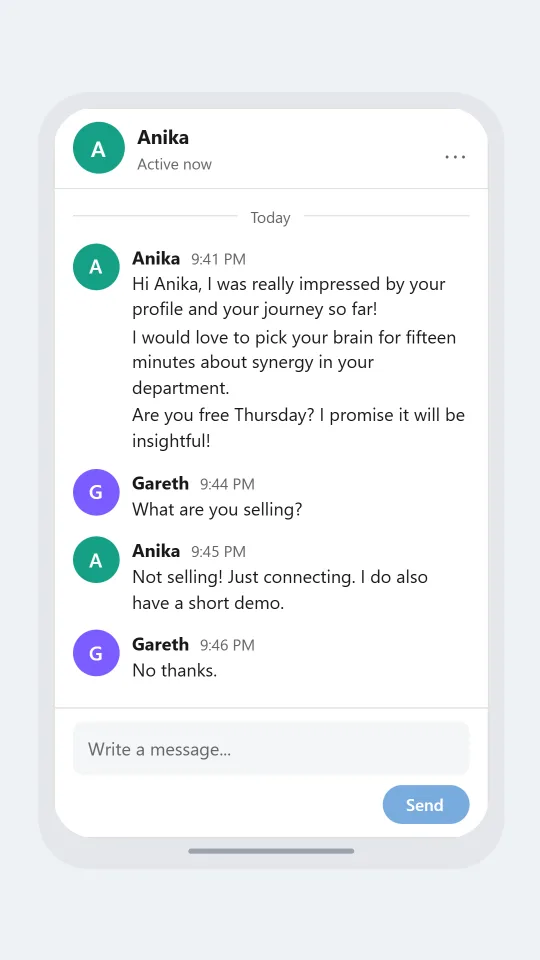
    LinkedIn-style thread where a sales rep sends a long pitch and receives a one word reply
    The fifteen minute ask
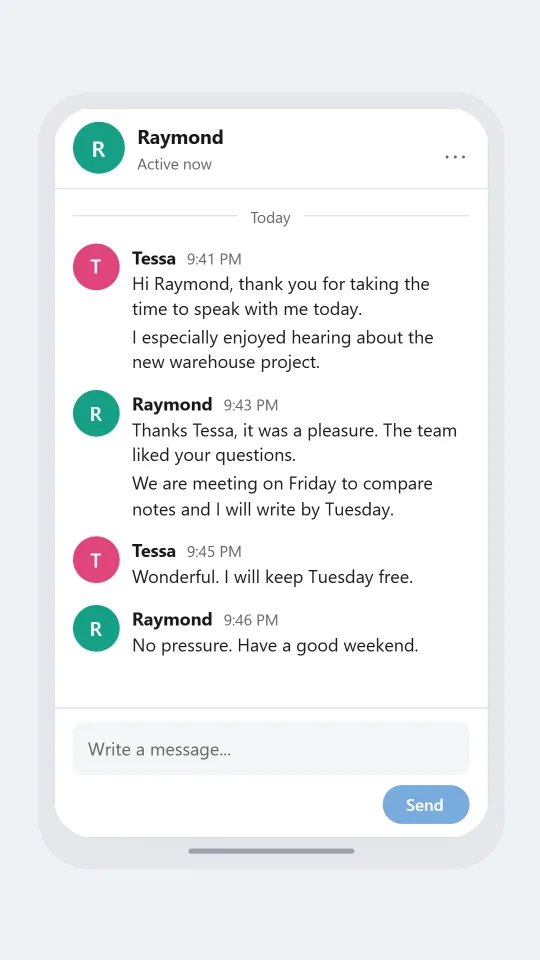
    LinkedIn-style professional thread where a candidate thanks an interviewer and gets a timeline for next steps
    Thanks for the interview
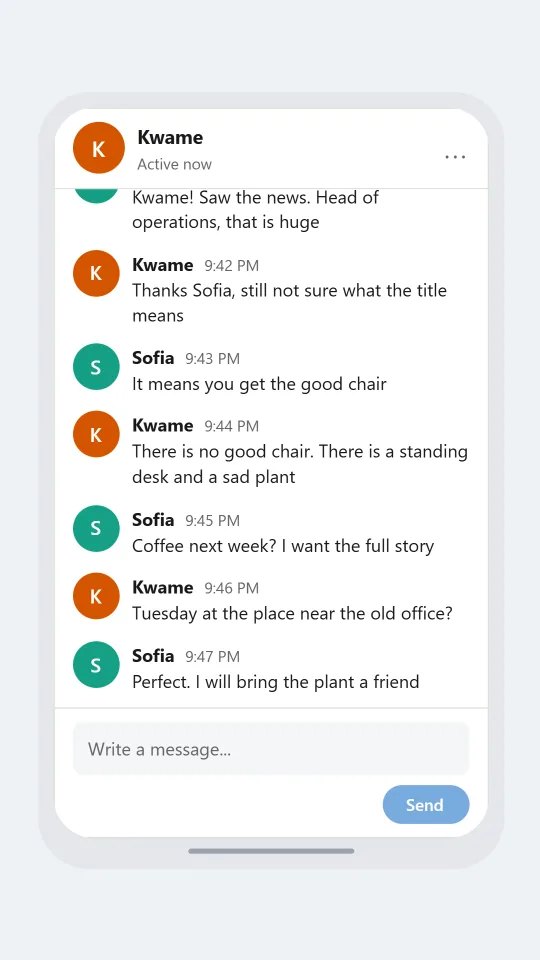
    LinkedIn-style thread between two former colleagues congratulating each other on a promotion and planning coffee
    Congratulations on the new role
    Make one now

    Writing a LinkedIn Messaging-style chat that feels right

    Professional networking messages have a voice you could pick out blindfolded. They start with a warm greeting and a compliment about someone's profile, move to a soft request for fifteen minutes, and end with an exclamation mark that tries a little too hard. Recruiters write polished paragraphs, candidates answer cautiously, and everyone says they are thrilled. Leaning into that tone is what makes a mock-up funny or instructive.

    There are no bubbles here. Each person's photo sits on the left, the name is in bold with a small time, and the message hangs below as ordinary text. A run of messages from one person shares a single header. That flat layout suits long messages, so you can let a connection request grow into a three-line pitch and then show the one-word reply.

    Good scripts include a cold outreach that goes nowhere, a thank-you after an interview, a congratulation on a new role and a polite decline. Keep names and employers invented and avoid anything that looks like a real recruiter's offer. ChatsRat draws its own original screen with no logo or brand blue beyond a calm tone, and is not affiliated with or endorsed by LinkedIn.

    Three examples to start from

    The fifteen minute ask

    A cheerful sales rep pitches a stranger and gets the shortest possible answer.

    Anika: Hi Anika, I was really impressed by your profile and your journey so far!
    Anika: I would love to pick your brain for fifteen minutes about synergy in your department.
    Anika: Are you free Thursday? I promise it will be insightful!
    Gareth: What are you selling?
    Anika: Not selling! Just connecting. I do also have a short demo.
    Gareth: No thanks.
    Open this example in the editor

    Thanks for the interview

    A candidate sends a thank-you and the interviewer gives a realistic timeline.

    Tessa: Hi Raymond, thank you for taking the time to speak with me today.
    Tessa: I especially enjoyed hearing about the new warehouse project.
    Raymond: Thanks Tessa, it was a pleasure. The team liked your questions.
    Raymond: We are meeting on Friday to compare notes and I will write by Tuesday.
    Tessa: Wonderful. I will keep Tuesday free.
    Raymond: No pressure. Have a good weekend.
    Open this example in the editor

    Congratulations on the new role

    Two former colleagues swap congratulations on a promotion and agree to meet for coffee.

    Sofia: Kwame! Saw the news. Head of operations, that is huge
    Kwame: Thanks Sofia, still not sure what the title means
    Sofia: It means you get the good chair
    Kwame: There is no good chair. There is a standing desk and a sad plant
    Sofia: Coffee next week? I want the full story
    Kwame: Tuesday at the place near the old office?
    Sofia: Perfect. I will bring the plant a friend
    Open this example in the editor

    See the first example play as a video

    What is included in this look

    • Photos on the left for both people. Each speaker's round photo or initial sits at the left edge of their first message in a run, so the thread reads like a list of posts rather than a pair of bubbles.
    • Bold name with the time beside it. The name appears in heavy type at the start of every run with a small grey time next to it, and follow-up lines from the same person stack without repeating it.
    • Active now status. The header card shows the contact's avatar and a status line that reads Active now, Away or Offline depending on the status you set for that person.
    • Reaction pills with counts. A reaction appears under the message as an outlined pill with the emoji and a number, the way a thumbs-up on a congratulation shows up in a thread.
    • Day divider and typing dots. A thin rule with the day sits across the top of the thread, and an optional row of typing dots appears beside the other person's photo near the bottom.
    • Reply box with a Send button. The bottom card holds a Write a message placeholder and a blue Send pill, giving a screenshot the unfinished feel of a reply that has not been sent.

    Questions

    Can I use it to write a recruiter message for a joke video?

    Yes, that is a common use. Invent the recruiter, the company and the role, then let the pitch run long. Satire works best when no real company or person can be recognised in it.

    Does it show read receipts?

    The platform setting for read receipts is available, but this flat thread layout does not draw a seen label under messages. If you want a visible read mark in a work scene, the Microsoft Teams look draws one.

    Is the LinkedIn look free?

    No. It sits on the paid plans, while the Free plan covers the free looks such as Discord. The plans page lists what each tier offers, including video export for short training clips.

    Does it use the real logo or colours?

    No. It uses plain shapes, system fonts and a calm blue for the Send pill, with no logo anywhere. ChatsRat is not affiliated with or endorsed by LinkedIn, so call the result a LinkedIn-style mock-up.

    What should I stay away from?

    Do not create a fake job offer, a fake reference or a fake message from a real recruiter or executive, and do not use it to mislead a job seeker. Use invented names and keep the purpose obvious.

    Simulated screens only. Not affiliated with LinkedIn Messaging. ChatsRat draws its own original screens and uses no logos.