ChatsRat

    Fake Outlook-style email generator

    This is the office version of the email look. It draws a blue-labelled inbox with your new message on top, then opens the thread as a stack of cards, each with a sender, a time and a body. It is made in the style of Outlook and suits corporate comedy, training scenarios on writing good emails and short workplace dramas about meetings and deadlines.

    A work email thread where a finance assistant gently chases a late budget form with polite replies
    A budget deadline and a gentle nudge
    A workplace email thread about two teams double-booking a meeting room on the same morning
    Two teams, one meeting room
    A colleague leaving on holiday writes a handover email and the team asks small practical questions in reply
    A handover note before holiday
    Make one now

    Writing a Outlook-style email-style chat that feels right

    Work email has a dialect. Messages open with Hi team or Dear all, close with Kind regards, and stack up phrases that sound agreeable while meaning something firmer: as discussed, going forward, just circling back. Readers of a mock-up recognise this language instantly, so a few well-placed phrases do more than any long paragraph of drama.

    Hierarchy is part of the picture. A junior person writes three careful sentences, a director replies with a single line, and someone from another department copies in the world. Reply all is a small public stage, and the story gets its tension from who answers, who stays silent, and how quickly the tone cools after a missed deadline.

    Keep scenarios ordinary: a budget, a room booking, a handover. Write short messages with realistic subjects, and let one detail escalate. ChatsRat draws this screen itself in its own style, with no logos or product artwork, and it is not affiliated with or endorsed by Microsoft or Outlook. The only visual difference from the other email look is the blue accent.

    Three examples to start from

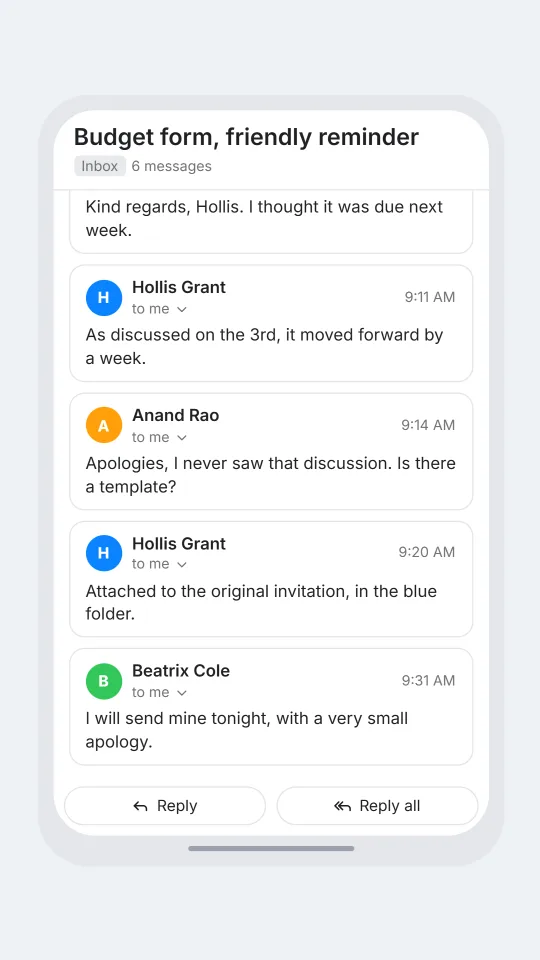
    A budget deadline and a gentle nudge

    Three people circle a missing form with extremely polite language and one honest sentence at the end.

    EMAIL Hollis Grant: Budget form, friendly reminder | Hi team, just circling back on the Q4 budget form. Could it reach me by close of play Thursday?
    > Beatrix Cole: Kind regards, Hollis. I thought it was due next week.
    > Hollis Grant: As discussed on the 3rd, it moved forward by a week.
    > Anand Rao: Apologies, I never saw that discussion. Is there a template?
    > Hollis Grant: Attached to the original invitation, in the blue folder.
    > Beatrix Cole: I will send mine tonight, with a very small apology.
    Open this example in the editor

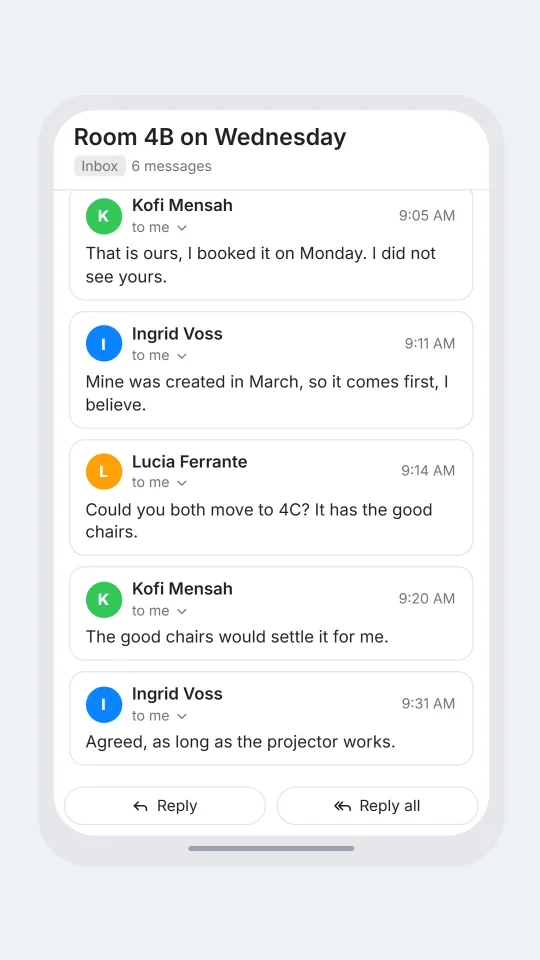
    Two teams, one meeting room

    A double-booked room produces the calmest argument in the office, with a surprise offer in the final card.

    EMAIL Ingrid Voss: Room 4B on Wednesday | Good morning. Our team has had 4B booked since March. I see a second invitation has appeared for 10am.
    > Kofi Mensah: That is ours, I booked it on Monday. I did not see yours.
    > Ingrid Voss: Mine was created in March, so it comes first, I believe.
    > Lucia Ferrante: Could you both move to 4C? It has the good chairs.
    > Kofi Mensah: The good chairs would settle it for me.
    > Ingrid Voss: Agreed, as long as the projector works.
    Open this example in the editor

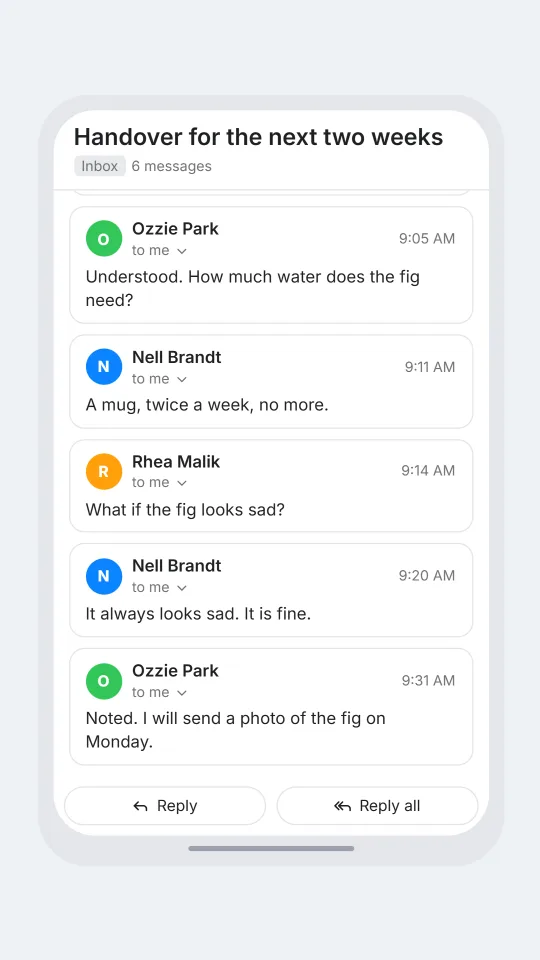
    A handover note before holiday

    A relaxed handover where every question is about the plant and nobody asks about the project.

    EMAIL Nell Brandt: Handover for the next two weeks | Hello both, I am away from Friday. The launch checklist is in the shared drive, and Ozzie has the keys. Please water the fig.
    > Ozzie Park: Understood. How much water does the fig need?
    > Nell Brandt: A mug, twice a week, no more.
    > Rhea Malik: What if the fig looks sad?
    > Nell Brandt: It always looks sad. It is fine.
    > Ozzie Park: Noted. I will send a photo of the fig on Monday.
    Open this example in the editor

    See the first example play as a video

    What is included in this look

    • Blue Inbox label. The inbox screen carries a blue Inbox heading under a rounded Search mail bar, which is the colour change that separates this look from its red sibling.
    • Highlighted new message. Your first email appears at the top of the list in bold with the sender's avatar, the subject, a trimmed preview of the body and a time stamp, ahead of three filler rows.
    • Single-line opening. The first email is written as sender, subject, a vertical bar and body in one line, which keeps even a long scenario easy to edit in the script box.
    • Thread of message cards. After the first reply, the screen shows the subject in large type, an Inbox tag with a message count, and one outlined card for every message in the thread.
    • To me line. Each card shows the sender with a small to me line and a chevron beside a time, so the thread reads as a mailbox seen from the recipient's side.
    • Reply and Reply all. Two rounded buttons sit along the bottom edge of the thread, and the screen scrolls so the latest message is the one in view during a video export.

    Questions

    What is the difference between this and the Gmail-style look?

    The layout and the script format are the same. The accent colour of the Inbox label is blue here and red in the other look, so pick whichever fits your setting, or use both in one video.

    Do I need a paid plan?

    Yes, the Standard plan or above is needed for this look. The free plan lets you try the editor with chat looks, which use the same cast and script ideas.

    How do I add a reply?

    Add a new line with the sender's name, a colon and the message. An arrow sign in front of the name marks it as a reply. The first line of the script must be the EMAIL line, with a subject and a body.

    Is it okay to make a fake message from my real employer?

    No. Do not imitate a real company, boss, bank or service, and never use a mock-up to deceive, phish or create fake evidence. Use invented people and make clear to your audience that the scene is a sketch.

    Does it include folders, flags or categories?

    No. The look draws only an inbox row, an Inbox tag, message cards and two reply buttons. If you want a folder or a category mentioned, put it in the text of a message, where it is read as an ordinary phrase.

    Simulated screens only. Not affiliated with Outlook-style email. ChatsRat draws its own original screens and uses no logos.